
Work Text:
This skin was inspired by this document that revealed how Claude (the AI model) had artifacts get brought over when text is directly copied from the website and pasted into AO3.
The adjustments that I made to that document's skin do this:
- Removes the very bright background, instead defaulting to what you set as the Parent skin's background. The red was too harsh for my eyesight.
- Puts a very bright warning above the title of the work "⚠︎ AI ARTIFACT ⚠︎". So you are warned before you start reading.
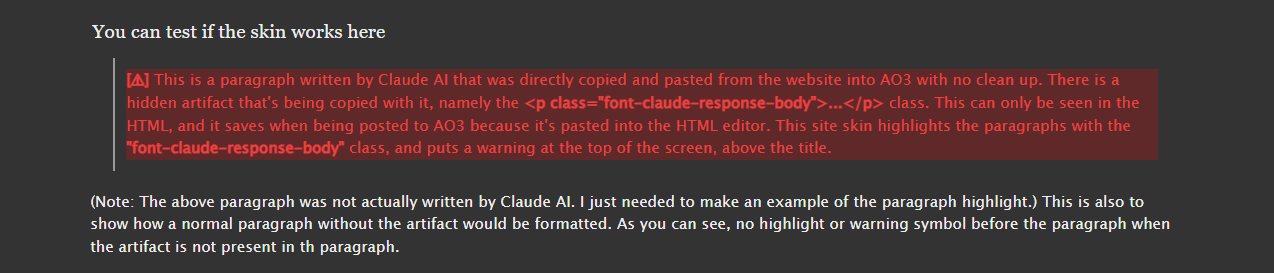
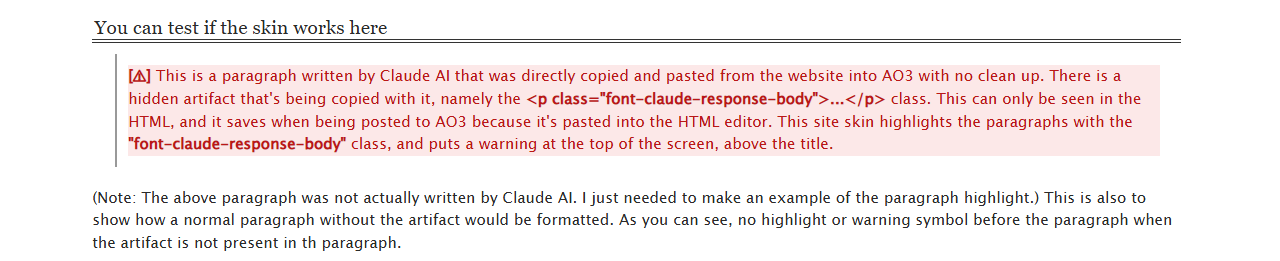
- Highlights the paragraph with the Claude artifact, so you can see which paragraph is activating the "⚠︎ AI ARTIFACT ⚠︎" warning.
This skin is not meant to be used in witch hunting authors that used AI for whatever reason. It's only to be used to keep the reader informed about things they can't see as the reader, compared to what the author is able to see. Please don't harass anyone, just mute and move on, as per fandom etiquette.
Examples and Links
Dark background - Reversi used as a default, can be applied to any dark skin tbh.

Light background - No parent skin as a default, can be applied to any light skin also.

Tutorial
- Create a new site skin. (Dashboard > Skins > Create Site Skin). Name it whatever you like.
- Paste the CSS you got from your preferred theme.
- Adjust the colors, symbols, and spacing if you wish.
- If you're already using a skin, set that skin as the Parent (Scroll down to Advanced > Parent > Add Parent)
- Scroll all the way down and press Submit.
- It will refresh the site. When that's done, scroll down again and press Use.
- Come back to this page if you want to test it. The paragraph below has the Claude artifact added for you to test.
NOTE: You can put it into the CSS of your existing skin, if you prefer that/it's easier for you. I just find it easier to adjust things (colours, spacing, etc) when it's spread into different skins.
You can test if the skin works here
This is a paragraph written by Claude AI that was directly copied and pasted from the website into AO3 with no clean up. There is a hidden artifact that's being copied with it, namely the <p class="font-claude-response-body">...</p> class. This can only be seen in the HTML, and it saves when being posted to AO3 because it's pasted into the HTML editor. This site skin highlights the paragraphs with the "font-claude-response-body" class, and puts a warning at the top of the screen, above the title.
(Note: The above paragraph was not actually written by Claude AI. I just needed to make an example of the paragraph highlight.) This is also to show how a normal paragraph without the artifact would be formatted. As you can see, no highlight or warning symbol before the paragraph when the artifact is not present in th paragraph.